Zero-Based Budgeting: How It Works, a Real Example, and the Best Apps for It
 The FreeBudget Team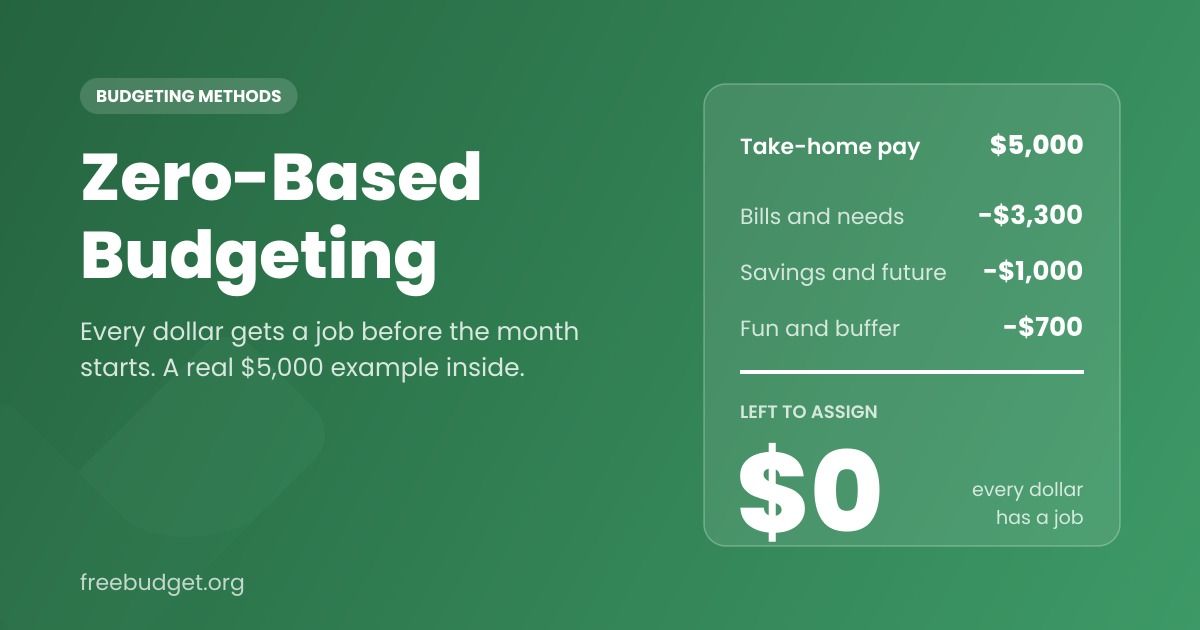
The name is the worst part of zero-based budgeting. It sounds like you're supposed to end every month with nothing in your bank account, which is the opposite of what anyone wants from a budget.
Here's what it actually means: income minus everything you assign equals zero. Every dollar you expect to earn this month gets a job before the month starts. Rent is a job. Groceries is a job. Savings is a job. "Fun money" is a job. When you've given out every dollar, the leftover is zero, and that zero is the goal.
It's one of the most popular budgeting methods for a reason. It's also one of the most misunderstood, so let's walk through how zero-based budgeting works, a full example with real numbers, where it tends to go wrong, and which apps handle it best.
How zero-based budgeting works
The formula fits on a sticky note:
Monthly income − all planned spending, saving, and debt payments = $0
That's it. The discipline isn't in the math. It's in the order you do things. With most budgets, you spend first and look at what happened later. With zero-based budgeting, you decide first and spend second.
Three ideas make it work:
- Savings is an expense. Money going to an emergency fund or retirement account gets assigned like rent does. It's not "whatever's left."
- Every month starts fresh. You build the budget from zero each month instead of copying last month's numbers without thinking. (In practice, most people copy last month and adjust. That's fine, as long as the adjusting actually happens.)
- Unassigned money is a decision you haven't made yet. A zero-based budget doesn't allow "extra." If there's $200 unassigned, you give it a job, even if that job is "buffer."
A real zero-based budget example
Let's say your take-home pay is $5,000 a month. Here's what a zero-based budget could look like:
- Rent: $1,600
- Groceries: $600
- Utilities and phone: $250
- Transportation (car payment, gas, insurance): $350
- Health insurance and medical: $200
- Student loan payment: $300
- Emergency fund: $500
- Extra retirement contribution: $250
- Sinking funds (car repairs, gifts, annual subscriptions): $250
- Fun money (restaurants, hobbies, going out): $400
- Subscriptions: $100
- Miscellaneous buffer: $200
Total assigned: $5,000. Income minus assigned: $0.
Notice a few things about this budget.
First, it's not austere. There's $400 for fun and $200 of buffer. Zero-based budgeting doesn't tell you what to spend on. It just asks you to decide in advance.
Second, $1,000 a month goes to the future: emergency fund, retirement, and sinking funds. That happens because each one got a line before the spending started, not because this person had better willpower.
Third, the buffer line exists. Every realistic zero-based budget has one. Life doesn't fit in eleven categories.
Zero-based budgeting vs. the 50/30/20 rule
The other method people usually compare this to is the 50/30/20 budget rule, which splits take-home pay into 50% needs, 30% wants, and 20% savings.
The difference is precision:
- 50/30/20 gives you three big buckets and trusts you to stay inside them. It's faster to set up and easier to maintain.
- Zero-based gives every dollar a specific line. It takes more work, but it shows you exactly where money goes and leaves nowhere for it to hide.
A good way to think about it: 50/30/20 is a compass, zero-based is a map. Plenty of people start with 50/30/20 and switch to zero-based once they want more control. Plenty of others try zero-based, find it exhausting, and are happier with 50/30/20. Both are valid.
Who zero-based budgeting works best for
Zero-based budgeting tends to click for people who:
- Feel like money disappears. If you earn a decent income but can't say where it went, assigning every dollar is the fastest way to find out.
- Are paying off debt. When extra money gets assigned on purpose, it's much easier to throw it at a balance instead of letting it drift into spending.
- Have irregular expenses. Because sinking funds get their own lines, surprise bills stop being surprises.
- Like knowing the plan. Some people find a detailed plan calming. If that's you, this method will feel good.
It's a harder fit if you hate detail, your income swings a lot month to month, or you've tried detailed budgets before and abandoned them. That's not a character flaw. It just means a simpler system might stick better.
Common zero-based budgeting mistakes
Most people who quit zero-based budgeting don't quit because the idea is wrong. They quit because of one of these:
Too many categories. Forty categories feels thorough in week one and becomes a chore by week three. Start with ten or twelve. You can always split a category later.
No buffer. A budget with zero slack breaks the first time a pharmacy run costs $30 more than expected. A small miscellaneous line saves the whole system.
Treating overspending like failure. You will overspend in some category. The zero-based move is to move money from another category to cover it, so the budget still adds up. That's not cheating. That's the method working.
Budgeting money you don't have yet. If you're paid biweekly or your income varies, budget only what you're confident you'll earn. If you have income that varies, one useful approach is to budget from last month's income instead of this month's guess.
Forgetting non-monthly costs. Car registration, annual subscriptions, holiday gifts. If they aren't in the budget as monthly sinking funds, they'll show up as emergencies.
How to start a zero-based budget this month
- Write down your take-home pay for the month. After taxes and deductions, the amount that actually hits your account.
- List your fixed costs. Rent, utilities, insurance, minimum debt payments, subscriptions.
- Add your savings goals as lines. Emergency fund, retirement, anything you're saving toward.
- Add sinking funds. Take last year's irregular costs, divide by 12, and give each a line.
- Add variable spending. Groceries, gas, restaurants, fun money. Use last month's real spending as a starting point.
- Adjust until income minus everything equals zero. If you're over, trim variable categories. If you're under, give the extra a job.
- Track as you go, and move money when you overspend.
If you've never budgeted before, our guide on how to start a budget for the first time covers the basics before you add the zero-based layer.
The best apps for zero-based budgeting
You can run zero-based budgeting on paper or in a spreadsheet. An app makes the tracking part much easier. Here are the honest options.
YNAB (You Need a Budget)
YNAB is the app most people think of for zero-based budgeting, and for good reason. The whole product is built around giving every dollar a job, and its teaching resources are excellent. If you want an app that actively coaches you through the method, YNAB is the gold standard. It costs $109 a year or $14.99 a month after a free trial.
EveryDollar
EveryDollar, from Ramsey Solutions, is also built around zero-based budgeting. The free version works with manual entry, and bank sync is part of the paid premium tier. It's simple and clean, and it fits especially well if you follow the Ramsey Baby Steps.
FreeBudget
This is ours, so take it with that in mind. FreeBudget lets you set a monthly budget for every category, then compares it to your actual spending in a Budget vs Actual report. That's all zero-based budgeting needs: assign your income across categories, then watch where reality lands. Rollovers can be set per category, so a sinking fund like car repairs carries its unspent balance forward while groceries resets each month. Budgets, categories, and reports are free, CSV import is free, and bank sync is an optional add-on with a small fee that covers connection costs. We don't coach the method as heavily as YNAB does, but you won't pay $109 a year to use it.
A spreadsheet
A two-column sheet (category and amount) with a formula that subtracts the total from your income is a perfectly good zero-based budget. The downside is manual tracking, which is where most spreadsheet budgets fade out.
We also compared the two biggest options head-to-head in FreeBudget vs YNAB if you're choosing between them.
Frequently asked questions
Does zero-based budgeting mean I spend all my money?
No. It means you assign all your money. Savings, investing, and debt payoff are assignments too. Ending at zero means nothing is unplanned, not that nothing is left.
What's the difference between zero-based budgeting and envelope budgeting?
They're close cousins. Envelope budgeting is a way of doing zero-based budgeting, where each category is an envelope, originally with physical cash. Once an envelope is empty, spending in that category stops for the month.
Can I do zero-based budgeting with irregular income?
Yes. The most common approach is to budget based on your lowest expected month, or on last month's actual income, and give any extra a job when it arrives.
What's the best free zero-based budgeting app?
EveryDollar's free version supports zero-based budgeting with manual entry. FreeBudget's budgeting, categories, and reports are free, with optional paid bank sync. YNAB is the most full-featured, but it's paid after the trial.
How long does it take to set up a zero-based budget?
The first one takes about an hour. After that, each new month usually takes 15 to 20 minutes, mostly adjusting last month's numbers.
The method is the valuable part, not the app. Give every dollar a job before the month starts, keep a buffer, and move money when life happens. If you'd like to try it without a subscription, you can set up your first zero-based month for free at freebudget.org.